7. Supported Network File Formats
Cytoscape represents networks as directed graphs, where nodes represent entities (such as genes, proteins, or metabolites) and edges represent relationships or interactions between these entities. All edges in Cytoscape are inherently directed, meaning they have a source node and a target node. However, Cytoscape does not interpret or assign semantic meaning to the imported graph structure - it simply preserves the topological relationships as specified in the input data. The biological or functional significance of nodes and edges is determined by the user’s interpretation and analysis.
Cytoscape can read network/pathway files written in the following formats:
Cytoscape Exchange Format (CX2)
Simple interaction file (SIF or .sif format)
Graph Markup Language (GML or .gml format)
XGMML (extensible graph markup and modelling language).
SBML
BioPAX
GraphML
Delimited text
Excel Workbook (.xls, .xlsx)
These formats vary in their complexity and the type of information they can store. Some formats focus primarily on network topology, while others can preserve additional metadata such as node attributes, edge properties, visual styling, and layout information. All file types listed (except Excel) are text files and you can edit and view them in a regular text editor.
7.1. Cytoscape Exchange Format (CX2)
The Cytoscape Exchange Format version 2 (CX2) is a JSON-based network data exchange format designed for efficient interoperability across various Cytoscape ecosystem applications, including Cytoscape Desktop, Cytoscape Web, and the Network Data Exchange (NDEx). CX2 organizes network data into modular “aspects,” each structured independently following its own schema. This aspect-oriented approach simplifies handling complex data such as visual styles, network topology, node and edge attributes, and layout coordinates, allowing consistent interpretation and presentation across different tools.
Originally introduced as an evolution of the Cytoscape Exchange (CX) format, CX2 was collaboratively developed by the Cytoscape and NDEx teams to better support the increasing complexity of biological networks and their associated metadata. CX2 enhances performance through a compact design optimized for web applications, reducing memory usage and improving network data transfer efficiency. Its extensible structure enables easy incorporation of new features without impacting existing compatibility, supporting future advancements within the Cytoscape community.
A simple CX2 network example with two nodes, one edge, attributes, and layout coordinates is shown below:
[
  {
    "CXVersion": "2.0",
    "hasFragments": false
  },
  {
    "attributeDeclarations": [
      {
        "networkAttributes": {
          "name": {"d": "string"}
        },
        "nodes": {
          "name": {"d": "string"},
          "type": {"d": "string"}
        },
        "edges": {
          "interaction": {"d": "string"}
        }
      }
    ]
  },
  {
    "networkAttributes": [
      {"name": "Simple Network Example"}
    ]
  },
  {
    "nodes": [
      {"id": 1, "x": 100, "y": 200, "v": {"name": "Node A", "type": "protein"}},
      {"id": 2, "x": 300, "y": 400, "v": {"name": "Node B", "type": "protein"}}
    ]
  },
  {
    "edges": [
      {"id": 100, "s": 1, "t": 2, "v": {"interaction": "binds"}}
    ]
  },
  {
    "status": [
      {"error": "", "success": true}
    ]
  }
]
For detailed information about the CX2 specification, supported aspects, and additional examples, please visit the Cytoscape Exchange Format documentation.
7.2. Cytoscape.js JSON
From Cytoscape 3.1.0 on, Cytoscape supports Cytoscape.js JSON files. You can use this feature to export your network visualizations to web browsers. Cytoscape.js has two ways to represent network data, and currently both reader and writer support only the array style graph notation. For example, this network in Cytoscape:
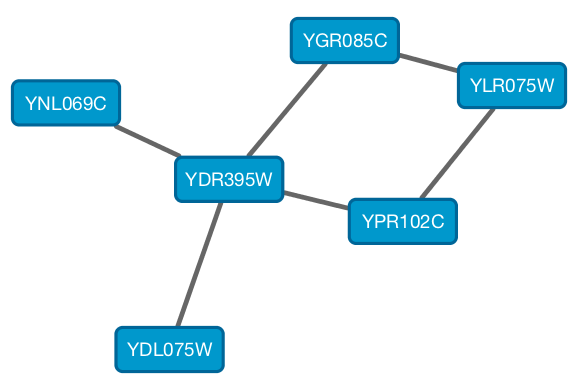
will be exported to this JSON:
{
  "elements" : {
    "nodes" : [ {
      "data" : {
        "id" : "723",
        "selected" : false,
        "annotation_Taxon" : "Saccharomyces cerevisiae",
        "alias" : [ "RPL31A", "RPL34", "S000002233", "ribosomal protein L31A (L34A) (YL28)" ],
        "shared_name" : "YDL075W",
        "SUID" : 723,
        "degree_layout" : 1,
        "name" : "YDL075W"
      },
      "position" : {
        "x" : 693.0518315633137,
        "y" : -49.47506554921466
      },
      "selected" : false
    }, {
      "data" : {
        "id" : "726",
        "selected" : false,
        "annotation_Taxon" : "Saccharomyces cerevisiae",
        "alias" : [ "RP23", "RPL16B", "S000005013", "ribosomal protein L16B (L21B) (rp23) (YL15)" ],
        "shared_name" : "YNL069C",
        "SUID" : 726,
        "degree_layout" : 1,
        "name" : "YNL069C"
      },
      "position" : {
        "x" : 627.3147710164387,
        "y" : -205.99251969655353
      },
      "selected" : false
    }, {
      "data" : {
        "id" : "658",
        "selected" : false,
        "annotation_Taxon" : "Saccharomyces cerevisiae",
        "alias" : [ "RPL11B", "S000003317", "ribosomal protein L11B (L16B) (rp39B) (YL22)" ],
        "shared_name" : "YGR085C",
        "SUID" : 658,
        "degree_layout" : 2,
        "name" : "YGR085C"
      },
      "position" : {
        "x" : 804.3092778523762,
        "y" : -245.6235926946004
      },
      "selected" : false
    }, {
      "data" : {
        "id" : "660",
        "selected" : false,
        "annotation_Taxon" : "Saccharomyces cerevisiae",
        "alias" : [ "KAP108", "S000002803", "SXM1" ],
        "shared_name" : "YDR395W",
        "SUID" : 660,
        "degree_layout" : 8,
        "name" : "YDR395W"
      },
      "position" : {
        "x" : 730.8733342488606,
        "y" : -157.50702317555744
      },
      "selected" : false
    }, {
      "data" : {
        "id" : "579",
        "selected" : false,
        "annotation_Taxon" : "Saccharomyces cerevisiae",
        "alias" : [ "RPL11A", "S000006306", "ribosomal protein L11A (L16A) (rp39A) (YL22)" ],
        "shared_name" : "YPR102C",
        "SUID" : 579,
        "degree_layout" : 2,
        "name" : "YPR102C"
      },
      "position" : {
        "x" : 841.1395696004231,
        "y" : -130.77909119923908
      },
      "selected" : false
    }, {
      "data" : {
        "id" : "578",
        "selected" : false,
        "annotation_Taxon" : "Saccharomyces cerevisiae",
        "alias" : [ "GRC5", "QSR1", "RPL10", "S000004065", "ribosomal protein L10" ],
        "shared_name" : "YLR075W",
        "SUID" : 578,
        "degree_layout" : 2,
        "name" : "YLR075W"
      },
      "position" : {
        "x" : 910.3755162556965,
        "y" : -217.0562556584676
      },
      "selected" : false
    } ],
    "edges" : [ {
      "data" : {
        "id" : "659",
        "source" : "658",
        "target" : "578",
        "selected" : false,
        "interaction" : "pp",
        "shared_interaction" : "pp",
        "shared_name" : "YGR085C (pp) YLR075W",
        "SUID" : 659,
        "name" : "YGR085C (pp) YLR075W"
      },
      "selected" : false
    }, {
      "data" : {
        "id" : "661",
        "source" : "658",
        "target" : "660",
        "selected" : false,
        "interaction" : "pp",
        "shared_interaction" : "pp",
        "shared_name" : "YGR085C (pp) YDR395W",
        "SUID" : 661,
        "name" : "YGR085C (pp) YDR395W"
      },
      "selected" : false
    }, {
      "data" : {
        "id" : "724",
        "source" : "660",
        "target" : "723",
        "selected" : false,
        "interaction" : "pp",
        "shared_interaction" : "pp",
        "shared_name" : "YDR395W (pp) YDL075W",
        "SUID" : 724,
        "name" : "YDR395W (pp) YDL075W"
      },
      "selected" : false
    }, {
      "data" : {
        "id" : "733",
        "source" : "660",
        "target" : "579",
        "selected" : false,
        "interaction" : "pp",
        "shared_interaction" : "pp",
        "shared_name" : "YDR395W (pp) YPR102C",
        "SUID" : 733,
        "name" : "YDR395W (pp) YPR102C"
      },
      "selected" : false
    }, {
      "data" : {
        "id" : "727",
        "source" : "660",
        "target" : "726",
        "selected" : false,
        "interaction" : "pp",
        "shared_interaction" : "pp",
        "shared_name" : "YDR395W (pp) YNL069C",
        "SUID" : 727,
        "name" : "YDR395W (pp) YNL069C"
      },
      "selected" : false
    }, {
      "data" : {
        "id" : "580",
        "source" : "578",
        "target" : "579",
        "selected" : false,
        "interaction" : "pp",
        "shared_interaction" : "pp",
        "shared_name" : "YLR075W (pp) YPR102C",
        "SUID" : 580,
        "name" : "YLR075W (pp) YPR102C"
      },
      "selected" : false
    } ]
  }
}
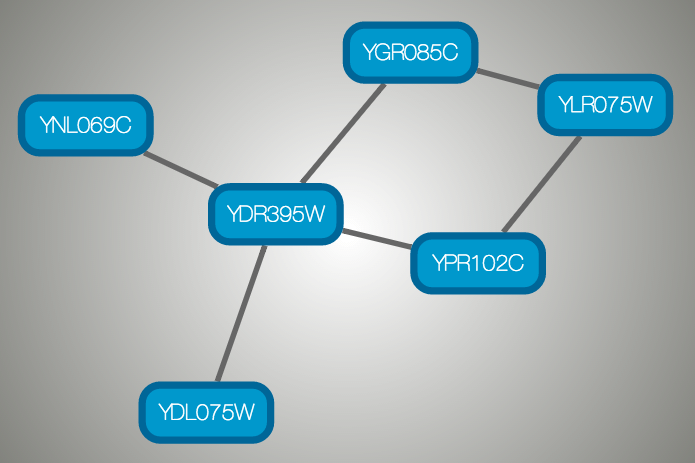
And this is a sample visualization in Cytoscape.js:
Important Note
Export network and table to Cytoscape.js feature in Cytoscape creates a JSON file WITHOUT style. This means that you need to export the style in a separate JSON file if you apply style to your network. Please read the Style section for more details.
7.3. SIF Format
The SIF format specifies nodes and interactions only, while other formats store additional information about network layout and allow network data exchange with a variety of other network programs and data sources. Typically, SIF files are used to import interactions when building a network for the first time, since they are easy to create in a text editor or spreadsheet. Once the interactions have been loaded and network layout has been performed, the network may be saved to GML or XGMML format for interaction with other systems.
The simple interaction format is convenient for building a graph from a list of interactions. It also makes it easy to combine different interaction sets into a larger network, or add new interactions to an existing data set. The main disadvantage is that this format does not include any layout information, forcing Cytoscape to re-compute a new layout of the network each time it is loaded.
Lines in the SIF file specify a source node, a relationship type (or edge type), and one or more target nodes:
nodeA relationship_type nodeB
nodeC relationship_type nodeA
nodeD relationship_type nodeE nodeF nodeB
nodeG
...
nodeY relationship_type nodeZ
A more specific example is:
node1 typeA node2
node2 typeB node3 node4 node5
node0
The first line identifies two nodes, called node1 and node2, and a single relationship between node1 and node2 of type typeA. The second line specifies three new nodes, node3, node4, and node5; here “node2” refers to the same node as in the first line. The second line also specifies three relationships, all of type typeB and with node2 as the source, with node3, node4, and node5 as the targets. This second form is simply shorthand for specifying multiple relationships of the same type with the same source node. The third line indicates how to specify a node that has no relationships with other nodes. This form is not needed for nodes that do have relationships, since the specification of the relationship implicitly identifies the nodes as well.
Duplicate entries are preserved. Multiple edges between the same nodes can have identical edge types. For example, the following specifies three edges between the same pair of nodes, two of type xx and one of type yy:
node1 xx node2
node1 xx node2
node1 yy node2
Edges connecting a node to itself (self-edges) are also allowed:
node1 xx node1
Every node and edge in Cytoscape has a name column. For a network
defined in SIF format, node names should be unique, as identically named
nodes will be treated as identical nodes. The name of each node will be
the name in this file by default (unless another string is mapped to
display on the node using styles). This is discussed in the section on
Styles.
The name of each edge will be formed from the name of the source and
target nodes plus the interaction type: for example,
sourceName (edgeType) targetName.
The tag “edgeType” can be any string. Whole words or concatenated words may be used to define types of relationships, e.g. geneFusion, cogInference, pullsDown, activates, degrades, inactivates, inhibits, phosphorylates, upRegulates, etc.
Some common interaction types used in the Systems Biology community are as follows:
  pp .................. protein - protein interaction
  pd .................. protein -> DNA
  (e.g. transcription factor binding upstream of a regulating gene.)
Some less common interaction types used are:
  pr .................. protein -> reaction
  rc .................. reaction -> compound
  cr .................. compound -> reaction
  gl .................. genetic lethal relationship
  pm .................. protein-metabolite interaction
  mp .................. metabolite-protein interaction
Delimiters
Whitespace (space or tab) is used to delimit the names in the simple interaction file format. However, in some cases spaces are desired in a node name or edge type. The standard is that, if the file contains any tab characters, then tabs are used to delimit the fields and spaces are considered part of the name. If the file contains no tabs, then any spaces are delimiters that separate names (and names cannot contain spaces).
If your network unexpectedly contains no edges and node names that look like edge names, it probably means your file contains a stray tab that’s fooling the parser. On the other hand, if your network has nodes whose names are half of a full name, then you probably meant to use tabs to separate node names with spaces.
Networks in simple interactions format are often stored in files with a
.sif extension, and Cytoscape recognizes this extension when browsing
a directory for files of this type.
7.4. GML Format
In contrast to SIF, GML is a rich graph format language supported by many other network visualization packages. The GML file format specification is available at:
http://graphviewer.nl/misc/gmllanguage/gml-technical-report.pdf
It is generally not necessary to modify the content of a GML file
directly. Once a network is built in SIF format and then laid out, the
layout is preserved by saving to and loading from GML. Properties
specified in a GML file will result in a new style named
Filename.style when that GML file is loaded.
7.5. XGMML Format
XGMML is the XML evolution of GML and is based on the GML definition. In addition to network data, XGMML contains node/edge/network column data. More information on Wikipedia:
https://en.wikipedia.org/wiki/XGMML
XGMML is now preferred to GML because it offers the flexibility associated with all XML document types. If you’re unsure about which to use, choose XGMML.
There is a java system property “cytoscape.xgmml.repair.bare.ampersands” that can be set to “true” if you have experience trouble reading older files.
This should only be used when an XGMML file or session cannot be read due improperly encoded ampersands, as it slows down the reading process, but this is still preferable to attempting to fix such files using manual editing.
7.6. SBML (Systems Biology Markup Language) Format
The Systems Biology Markup Language (SBML) is an XML format to describe biochemical networks. SBML file format specification is available at:
7.7. BioPAX (Biological PAthways eXchange) Format
BioPAX is an OWL (Web Ontology Language) document designed to exchange biological pathways data. The complete set of documents for this format is available at:
7.8. GraphML
GraphML is a comprehensive and easy-to-use file format for graphs. It is based on XML. The complete set of documents for this format is available at:
7.9. Delimited Text Table and Excel Workbook
Cytoscape has native support for Microsoft Excel files (.xls, .xlsx) and delimited text files. The tables in these files can have network data and edge columns. Users can specify columns containing source nodes, target nodes, interaction types, and edge columns during file import. Some of the other network analysis tools, such as igraph (https://igraph.org/), has feature to export graph as simple text files. Cytoscape can read these text files and build networks from them. For more detail, please read the Import Free-Format Tables section of the Creating Networks section.